
- Problem
- Understanding why an agent took an unexpected path
- Capture
- Model calls, tool events and session history
- Interface
- Timeline inspection and replay branches
- Our role
- Agent tracing, replay tooling and interface
The answer is only the last event
An agent's final response does not explain the path it took. Its result may depend on an earlier model call, a tool response, a changed configuration or a file it wrote. When something goes wrong, asking the agent to try again can produce a different sequence and leave the original cause unclear.
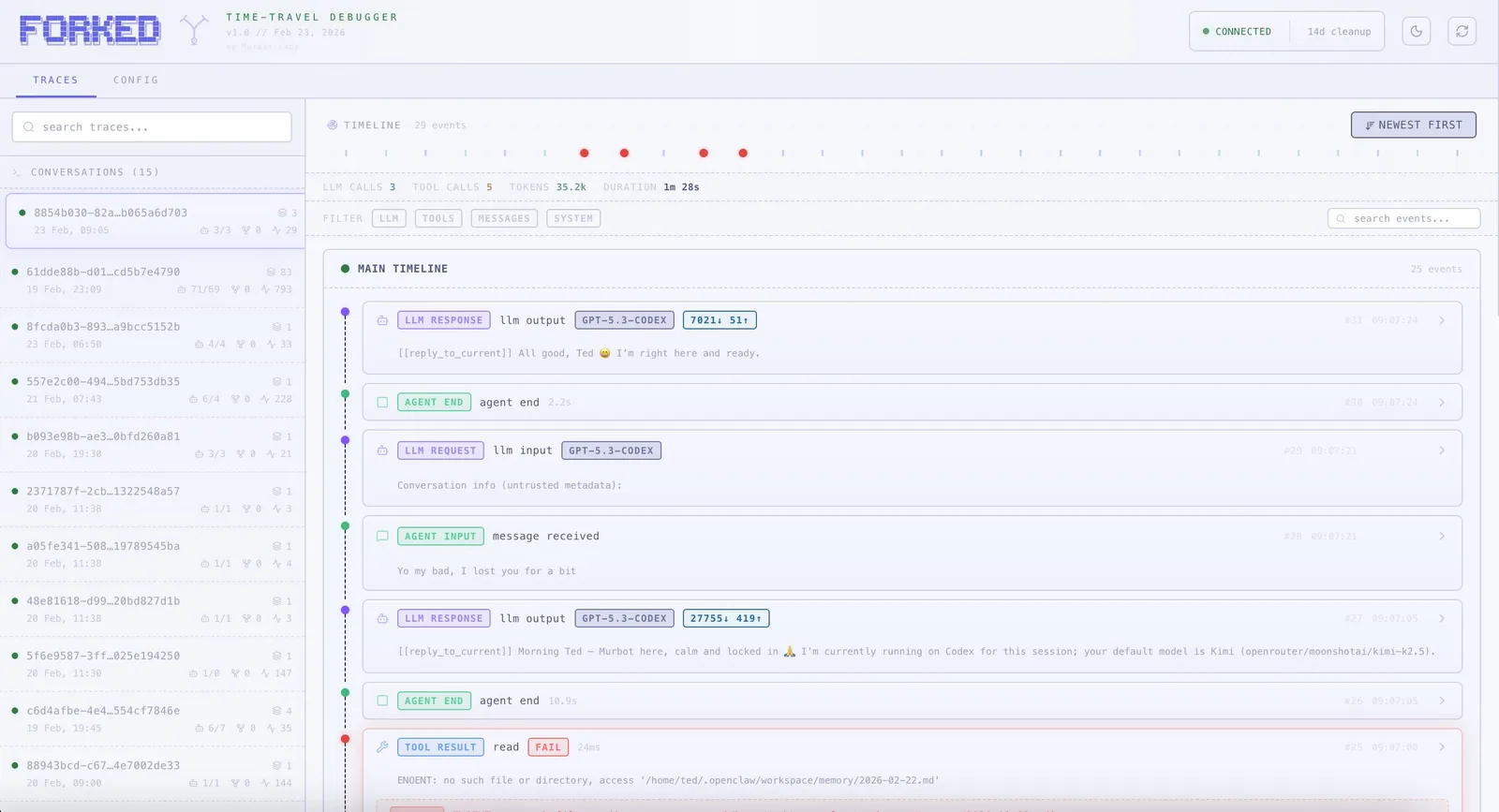
Forked is our engineering project for inspecting those sequences in OpenClaw setups. It captures model requests and responses, tool calls and results, session events and configuration changes. The purpose is to make the run inspectable instead of reconstructing it from memory.
Capture, store, inspect
The implementation is split into a tracing plugin, a local daemon and a browser interface. The tracer sends events to the daemon; the daemon stores the trace and exposes it to the UI. The timeline makes session history, tool activity and model events navigable. Filters help isolate the part of a run that needs attention.
- Model requests and responses, including available usage information.
- Tool calls and results, with snapshots around supported file writes.
- Session and configuration events alongside the model activity.
- A timeline that separates the original session from replay branches.
Compare a different path
A fork starts from an earlier event and explores a changed model, prompt or configuration. The UI presents the branch alongside the original history so the engineer can inspect where behaviour diverged. Supported file snapshots help reconstruct local state for that investigation.
A recorded event history and a new live model call are different things. Replaying does not promise that a model will produce an identical result, and restoring local files does not undo external actions. A useful replay experiment therefore has a controlled scope and explicit treatment of connected tools.
Why it matters to business agents
If an agent updates a CRM or prepares an answer from company information, its owner needs to understand which sources and actions produced that result. Logs and review tools help distinguish a missing source, a bad instruction, an integration failure and an unsuitable model response. Those are different problems and need different fixes.
Forked is evidence of our work on agent observability and debugging. It is an owned engineering project, not a customer ROI case study. This page does not claim a measured reduction in incident rates or a performance benchmark.
What we carry into an implementation
A custom-agent build needs an agreed task boundary, traceable actions, representative tests and an owner for failures. A visually convincing chat interface cannot replace those operational details. We scope the inspection and support path alongside the agent's useful actions.
For a simpler fixed process, a workflow with validation and exception handling may be a better choice. The same principle applies: the team should be able to see what happened and recover when a step fails.